

You open your wallet and see the same situation as always. Stale grocery receipts, a pharmacy receipt from weeks past, something from the hardware store and maybe a restaurant bill you hardly recall? Some are faded. Some are folded so many times the text is hard to read. One is almost gone. Let’s know about AI Receipt Scanner Tools in 2026 in this article.
You close the wallet and tell yourself you’ll deal with it later.
This is how most people handle receipts. It works fine until the day it doesn’t. Until you need proof for a return. Until tax season hits. Until work asks for expense records and you’re digging through old bags and coat pockets for a receipt from months ago.
An AI tool that scans and organizes receipts won’t magically fix everything. But it does change the real problem. Instead of “I can never find this when I need it,” you get “I know exactly where this is.”
Here’s how it works for beginners.
AI Receipt Scanner Tools in 2026

Why People Never Keep Receipts Organized
It’s useful to be honest about why receipt organization fails so often. The solution only works if it fixes the actual problem.
Receipts are small, easy to forget, and awkward to handle. They come out of the machine, go into a pocket or wallet, and a few days later they’re a wrinkled mess at the bottom of a bag. Thermal paper fades quickly from heat and friction, so many become hard to read.
The same pattern shows up again and again: people plan to organize them “later.” The pile grows. They clean a drawer and find dozens of receipts they don’t even remember. There is a lack of system, nothing to put them in, and at what point even to begin?
Some of us are actively aware that we really should get a better handle on the receipts.
The challenge is coming up with a system that offers less friction than just cramming the paper right back in a drawer and tackling it another time.
Old-school approaches—envelopes, folders, or typing everything into a spreadsheet—usually take more effort than the receipts seem worth. So the pile keeps growing until one specific receipt suddenly matters, and the stress starts.
The Receipt Delay Cycle
Most don’t lose receipts not because they care.
They lose them because every single lead feels like nothing the moment they get it.
It goes in the wallet. Eventually it finds its way in to a drawer or shopping bag. A few weeks later its just part of this pile that is so annoying I do not want to sort through it.
Funny thing is, receipt only becomes worthwhile when you urgently need to return the item, activate a warranty, claim reimbursement etc. or for tax purposes (in which case you actually have to keep it properly).
The real issue isn’t organization.
It’s putting it off.
AI works well here because it breaks that cycle before the pile has a chance to form.
When Receipts Suddenly Become Important
Most receipts feel optional until the moment they’re not. These are the times a missing receipt turns into a real problem:
Returns and exchanges. Many stores need a receipt, especially after a few days. Saying “I know I bought this here” usually isn’t enough.
Warranty claims. This is especially common for appliances, electronics, and tools. You could even struggle to get a repair or replacement without the receipt.
Tax time. Evidence is everything, and without it, you cannot substantiate home office costs or medical expenses or donations or business purchases.
Expense reimbursements. If your job pays you back for work spending, a rough guess at the amount won’t work. The receipt is what gets you the money.
Insurance claims. After theft, water damage, or other loss, you usually need to show what you owned and what you paid.
Home improvement records. When you sell a house, documentation of upgrades can affect the price and your taxes.
One of the most frustrating moments I help clients through is discovering after-the-fact that it was this one receipt that actually did matter. After all, the only time for system set up is before things get hot and heavy.
How AI Can Help You Organize Receipts
Most people think it is a little more complex than the basic process actually is.
Step 1: Take a photo of the receipt.
Use your phone camera or a receipt app. Lay it on a table or something that is even and bright enough to see all the information Photo quality matters.
Step 2: AI reads the information.
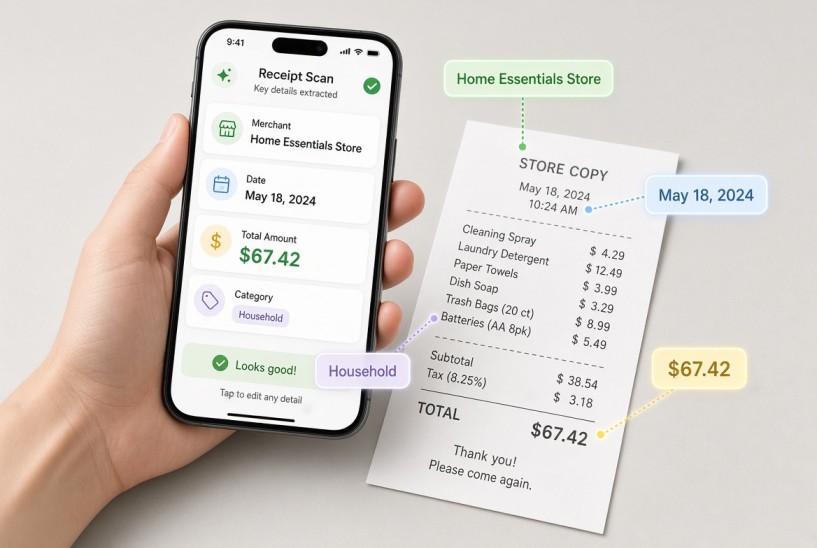
The tool uses OCR (optical character recognition) to pull out the important parts: date, store name, total amount, and sometimes the list of items.
Step 3: The receipt gets categorized. Either the app will predict a category based on the store, or you can agree/correct it. Popular categories include groceries, dining, home improvement, medical, travel & business.
Step 4: It’s saved and searchable.
Both the photo and the extracted details are stored digitally. Looking for “the Home Depot receipt from June” becomes a quick search instead of digging through paper.
Step 5 (optional): Get summaries or export.
Many tools can show spending by category or time period. This helps with budgets, expense reports, or tax preparation.
One thing beginners often underestimate: step three still needs a quick human check. AI can suggest a category, but it doesn’t know your reason for the purchase. A lunch could be personal or a work meal. A pharmacy run could be medical or just household items. A fast review prevents confusion later.
The Best AI Tools for Scanning and Organizing Receipts
For beginners: Google Photos with ChatGPT
Not designed specifically for receipts, but does the trick. Snapshot your receipts and keep them in Google Photos. Then you can show images to ChatGpt and ask it to extract information, summarize sums or classify etc. You will learn for free and it is based of tools you already have.
The catch is that this means it takes more manual work. You are still doing the organizing–AI just helps read and sort through it.
Dedicated receipt apps: Expensify, Fetch, Smart Receipts
If ever there was an app for scanning receipts, it would have to be Expensify. It scans receipts, extracts line items and integrates with accounting software. Which offers a free tier with esssential features.
Fetch Rewards is heavily grocery receipt-based, rewards based. If you have most of your receipts from grocery stores and looking for something straightforward, it comes in handy
Smart Receipts is a free open-source mobile app for scanning receipts and generating expense reports. No monthly charges and it is perfect to track personal use or simple tracking.
iOS scanning + ChatGPT (For iPhoneonly)
Notes or Files app with a built-in document scanner gives you clean scans of receipts. Take the photos there, then share them with ChatGPT and ask for extraction and categories. It’s free and reliable, though not fully automatic.
For business expenses: Dext (formerly Receipt Bank)
For freelancers and small businesses who regularly process business receipts, Dext is more focused. It receives your receipts, pulls the data and integrates with accounting software. If this is something that you deal with regularly, the subscription can be worth it.
AI Prompts You Can Copy
When you use ChatGPT or a similar tool with receipt photos or text:
Categorize a group of receipts:
So here are some of the receipts that I have taken photographs of. I want you to tell me for each of these: merchant, date, total, and best category ( groceries / dining / medical / home improvement / travel/other )
Create a spending summary:
Can you write a brief overview of my spending by category from these receipts? Give me the total by category and also give me the grand total.
Organize by month:
“Organize these receipts by month. Show me the total spent each month and a list of receipts in each month.”
Find possible duplicates: Go through these receipts, let me know if any amount or merchant or date appears more than once.
Prepare for a return or reimbursement:
“I need to find the receipt from [merchant] around [date range] for approximately [amount]. Here are my recent receipts — which one matches?”
Sort for taxes: Organize these receipts into things that could be related to taxes: medical, home office, charitable contributions, business meals and entertainment expenses and other possible-deductible expenses.
What AI Can Miss (And How to Handle It)
For example: There is an assumption that a scanned receipt is always flawless. It is mostly sufficient, but not always.
Blurry or dark photos. Scanning requires flat receipts, good light and a steady hand. A creased receipt in bad lighting can cause discrepancies. The straightforward solution is to snap the picture instantaneously, when the receipt still looks good and before it makes its way into a wallet.
Faded thermal paper. Lots of receipts fade away in weeks, especially when exposed to heat light or friction. Some text may already be unreadable if you wait too long!
Tip and tax mix-ups. Restaurant receipts can confuse the AI. This may select the pre-tip amount, the post-tip total, or even have a checkmark over the tax line. Tip — Always verify restaurant totals prior to reimbursement or taxes.
Handwritten notes. AI usually reads only the printed text. Anything written by hand is often ignored.
Wrong automatic categories. The tool doesn’t know your purpose. A coffee shop visit might be labeled “dining” when it was a work meeting. A pharmacy stop might be marked “health” when it was soap and snacks. A quick human check of the category is worth the few seconds.
The Scan-as-You-Go Method
The most helpful change for receipt organization isn’t the app itself—it’s when you do it.
A lot of people try to handle receipts in batches. They pile up for a week or a month, then attempt to scan all at once. It can work, but it is more painful than it has to be. The pile feels big. Some receipts have already faded. You’ve forgotten what some of them were for.
Scanning one receipt right after the purchase takes about thirty seconds. There’s nothing to organize because it’s just one item. With time the receipts remain sorted and the pile never quite forms.
After doing this a few times in a row, most people pick up on the difference. At least you do not face a big stack later to go against after getting so annoyed. The habit sticks because the effort is low.
Keep the receipt app or camera easy to reach on your phone. The main barrier isn’t motivation—it’s how easy it is to start.
The 30-Second Receipt Rule
Before you leave the store or get in the car:
1. Take out your phone.
2. Scan or photograph the receipt.
3. Check that the image is readable.
4. Then put the paper away—or toss it if you’re fine keeping only the digital version.
The goal isn’t a perfect filing system.
It’s stopping the pile from starting in the first place.
Real Examples
The warranty claim that almost didn’t work: Someone needed to return a space heater that failed after four months. The store asked for proof of purchase. Email had nothing. The scanning app had the November receipt with the date and amount. The return went through.
Less stress at tax time: A freelancer used an AI scanning app for half a year. At tax season they filtered by the “business” category, exported the list, and gave it to their accountant. Things turned from a messy box of paper into a record that could be searched.
The medical expenses they didn’t remember: At the end of the year one person noticed she was out-of-pocket a lot for her medical care. They opened the receipt app, sorted by “medical” and immediately saw a dentist bill, prescriptions, and a specialist they had completely forgotten.
The records were already there.
Home improvement documentation: A homeowner saved receipts for appliances, materials, and contractor payments in the app. Years later when selling the house, they could show the documented costs, which helped with the sale and taxes.
When AI Is Not Enough
It’s important to be clear about the limits of digital receipt tools.
Some situations still need the original paper. Certain stores and warranty processes require the physical receipt, not a photo. Check this before throwing the paper away.
Tax records need to be reliable. A digital photo is usually fine for most tax purposes, but rules can vary. If you’re claiming large deductions, talk with a tax professional about what is accepted in your situation.
Legal or formal claims may have stricter rules. Insurance claims, disputes, or official reimbursements sometimes need documentation that a simple photo may not fully meet. Don’t assume a scan carries the same weight as the original in every case.
AI organizes—it doesn’t audit. A receipt scanner helps you find and track what you have. It does not check that categories are correct for taxes, spot strange charges on your accounts, or replace professional financial advice.
Also, you can read: How can anyone Organize Paperwork With ChatGPT ? (An Honest Beginner’s Guide)
Frequently Asked Questions
What’s the best free tool for scanning receipts?
For basic scanning and organizing, Smart Receipts (free app) or Google Photos plus ChatGPT works well at no cost. Fetch is free if you mainly deal with grocery receipts and want rewards. Expensify has a limited free option for business tracking.
Do I need to scan every receipt?
No. Focus on the ones that might matter later: possible returns, items under warranty, business expenses, medical costs, and home improvement purchases. Everyday grocery and casual buys usually don’t need permanent storage.
What if the receipt is already faded or blurry?
Photograph it in the best light of the time—natural window light is usually better than on ave indoor lights. Lay it completely flat. If it is already difficult to read for yourself, a scan may not be even better. Scan important receipts immediately after purchase.
Is a digital photo of a receipt legally acceptable?
Yes—at least for most daily purposes, for whatever people need (returns, expense reimbursements, basic tax records). In more serious situations (like some insurance claims or for formal legal proceedings), see what the exact requirements are. When in doubt, carry the physical first until you know that the digital version is sufficient.
Should I throw away paper receipts after scanning?
For small purchases, yes, once you’ve confirmed the scan is clear and accurate. For the important ones (appliances, warranties, big purchases) you may want to hang onto the paper for a little while as insurance against losing something as you get used to your system.
Can AI automatically sort my receipts without me doing anything?
Not completely. The better tools handle reading and a first category automatically, but a quick human look at the amount and category is still useful—especially for anything that will go toward reimbursement or taxes. A few seconds of review now can prevent problems later.
Summary: Stop Creating the Pile
The good news is that once you stop building the pile, receipt organization becomes much less overwhelming.
It fails not because people don’t care, but because the usual habit—stuffing receipts away and handling them “later”—is almost designed to create the messy drawer you already have.
An AI tool for scanning and organizing receipts requires no willpower or heath-matrix-like arrangement. In particular, this requires only one simple habit: take a picture of the receipt before you leave the counter.
Start this week. For any purchase where you get a paper receipt, take a photo of it the same day. Use a receipt app, your phone’s document scanner, or just your camera roll. Do that for a week and notice whether the pile looks different.
Most people are surprised by how much that one change helps—not because the system is fancy, but because the pile stops forming in the first place.